
Introduction
Take a look at these passwords:
vfccjdbrpfntqybrk.lfaeylfvtynfkmystbccktljdfybzbnjvtufkjdbhecyfzbyatrwbjyyfztybnyjhfrtnyfzhflbjkjrfwbjyyfzTo you they look randomly generated, but to me these are Russian passwords. Russian transliteration to be precise. So how exactly did I crack these passwords, and what do they even mean?
What is Transliteration?
Transliteration is not the same as translation. When you translate a word into English, you change its meaning into English; but when you transliterate it, you only change how it’s written or pronounced using the English alphabet, while keeping the word’s original meaning.

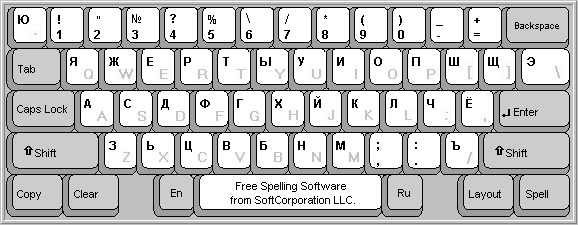
This is a Russian QWERTY keyboard; it has both Russian and English letters. If we map out Russian letters to their equivalent English letters according to this keyboard, then we have just translitered Russian into English.
For example, the Russian letter Ф is mapped to A according to this keyboard. Ы maps to S, B maps to D, etc. To automate this tedious task, we can leverage sed from Linux:
s/A/F/gs/Ф/A/gs/B/D/gs/В/D/gs/И/B/gs/С/C/gs/C/C/gs/T/N/gs/Е/T/g56 collapsed lines
s/E/T/gs/У/E/gs/П/G/gs/Н/Y/gs/H/Y/gs/Р/H/gs/P/H/gs/З/P/gs/Ш/I/gs/О/J/gs/K/R/gs/Л/K/gs/Д/L/gs/М/V/gs/M/V/gs/Ь/M/gs/Щ/O/gs/Й/Q/gs/Ы/S/gs/Г/U/gs/Ц/W/gs/Ч/X/gs/Я/Z/gs/а/f/gs/a/f/gs/ф/a/gs/и/b/gs/б/b/gs/Б/b/gs/с/c/gs/c/c/gs/т/n/gs/в/d/gs/е/t/gs/e/t/gs/у/e/gs/н/y/gs/п/g/gs/р/h/gs/p/h/gs/з/p/gs/ш/i/gs/о/j/gs/к/r/gs/k/r/gs/л/k/gs/д/l/gs/ь/m/gs/щ/o/gs/й/q/gs/ы/s/gs/г/u/gs/м/v/gs/ц/w/gs/ч/x/gs/я/z/gsmeans substitution/Ф/what we want to replace/A/what want to take place/gmeans to do this globally (i.e do it for the whole file)
Try it:
$ echo "привет" | sed -f translit.sedghbdtnLet’s Transliterate Russian Passwords
Now that we understand and can implement transliteration with the script above, how do we find Russian passwords? Maybe there is a rockyou-russian.txt for us to leverage?
Unfortunately (as far as I’ve searched), due to many websites only allowing UTF-8 characters into their database, any leaked Russian password is merely an English word/phrase or a Russian word/phrase translitered. We must leverage something else…
Wikidumps
The WikiMedia Foundation allows us access to their database, which means we can download Russian Wikipedia articles, remove digits and punctuation, lower case all characters, and transliterate them with our translit.sed script. We can also use other sources, such as:
To remove digits, punctuation, and lower case all characters within our source file, we can use tr:
$ cat source.dict | tr -d '[:digit]' | tr -d '[:punct]' | tr '[:upper:]' '[:lower]' > prepared-source.dictExplain this
catreads our file and outputs it tostdout|pipes ourstdoutto the next binary (in this case it’str)tr -d '[:digit]'removes digitstr -d '[:digit]'removes punctuationtr '[:upper:]' '[:lower]'lowercases uppercase characters>streams the result to a file
Before transliterating our new prepared file, we must deduplicate it (remove duplicates). We can use nil0x42/duplicut
$ git clone https://github.com/nil0x42/duplicut$ cd duplicut/ && make$ ./duplicut -o deduplicated-prepared-source.dict prepared-source.dictNow we can transliterate:
$ cat deduplicated-prepared-source.dict | sed -f translit.sed > transliterated.dictOnce we have generated a transliterated file, we should deduplicate it one last time:
$ ./duplicut -o deduplicated-transliterated.dict translitered.dictWe’re done. We can use this in Hashcat to crack complex passwords.
Using Combinator Mode to Crack Long Transliterated Passwords
The passwords I showcased above were all cracked using Hashcat’s combinator mode. To put it simply, Hashcat takes two wordlists, and then creates a password combining them together.
For example, if chickennoodle is in file1.txt and dumpling in file2.txt, then:
$ hashcat -a 1 --stdout file1.txt file2.txtchickennoodledumpling...Would produce the password above. We can leverage this by passing deduplicated-transliterated.dict twice:
$ hashcat -a 1 --stdout deduplicated-transliterated.dict deduplicated-transliterated.dictvfccjdbrpfntqybrk.lfaeylfvtynfkmystbccktljdfybzbnjvtufkjdbhecyfzbyatrwbjyyfztybnyjhfrtnyfzhflbjkjrfwbjyyfz...Conclusion
At the end of the day, nothing in computers is truly random. We can use other techniques to help us generate pseudorandom passwords to crack even more complex passwords. The lesson to be learnt here is to always use an extremely long, complex password that has upper and lower cases, symbols, and digits. I can assure you that 4tYb!n6y$%/Jh)f.r3T-n/|yF?zh8*flb09Jkj!RFw[bjyYfZ!26&? is significantly more difficult to crack than tybnyjhfrtnyfzhflbjkjrfwbjyyfz. Use password managers (like Bitwarden), change your passwords as often as you can, and sign-up for data breach alerts from Have I Been Pwned and other sites.
As always, happy cracking, do not use it for malicious purposes, obviously.